
Envato Elements Review 2025 — The Ultimate Creative Toolkit for Designers & Content Creators
Discover why Envato Elements is the best subscription for creators in 2025. Unlimited downloads, millions of assets, templates, and tools for designers, YouTubers, freelancers, and businesses.
DIGITAL ASSETS
Daily Trend Vision
12/1/20254 min read


Introduction: The Creative World Is Changing Fast
In 2025, content creation is no longer optional — it’s a requirement.
Whether you’re a designer, YouTuber, marketer, student, small business owner, or a new freelancer, you need visuals that stand out.
That’s where Envato Elements becomes a game-changer.
Envato Elements gives you unlimited downloads of premium digital assets — for one single monthly subscription.
From video templates to fonts, stock photos, 3D assets, website themes, and AI templates, it’s the one toolkit every creator should have.
This blog breaks down what it offers, who it's for, must-download items, pricing breakdown, and how beginners can use it to start earning today.

1. What Is Envato Elements?
Envato Elements is a subscription-based digital asset library offering:
12+ million assets
Unlimited downloads
One license for personal & commercial use
New items added weekly
Top-tier creative tools for every skill level
It includes:
🎬 Video Templates
🎨 Graphics & Design Assets
🖋 Fonts
📸 Stock Photos
🌐 Website Themes (WordPress, Shopify, etc.)
🔊 Music & Sound Effects
📊 Presentation Templates
👓 3D Assets
📱 Social Media Templates
📝 Mockups
Basically, everything you need to create content fast and professionally.
2. Why Envato Elements Is Worth It (Especially in 2025)
✔ Unlimited Downloads
Download 1 file or 1,000 — price stays the same.
✔ Commercial Licensing
Perfect for freelancers, agencies, and business owners.
✔ Saves a Massive Amount of Time
Instead of creating from scratch, start with pro-level templates.
✔ Constantly Updated Library
Fresh content every week keeps your brand modern.
✔ Affordable Pricing
Compared to buying single assets (often $30–$80 each), a full month of Envato costs less.
✔ Beginner-Friendly
No design experience needed — templates are 80% done.
3. What You Can Download (Full Breakdown)
Video Creators & YouTubers
Premiere Pro templates
After Effects templates
Openers
Lower thirds
Transitions
LUTs & color presets
Music & SFX
Animated titles
Social media animations
Graphic Designers
Logo templates
Branding kits
Typography packs
Icon sets
UI kits
Scene creators
Mockups (t-shirts, packaging, posters)
Content Creators & Social Media Influencers
Instagram reels templates
TikTok video templates
Carousel layouts
Thumbnail templates
Background music
Animated stickers
Canva templates
Web Designers & Developers
WordPress themes
Shopify themes
HTML templates
UX wireframes
Landing page designs
Students & Professionals
Resume templates
Presentation decks
Pitch decks
Infographics
Businesses & Agencies
Company branding
Corporate slides
Ad templates
Brochure layouts
Business card designs
4. Pricing Breakdown (2025)
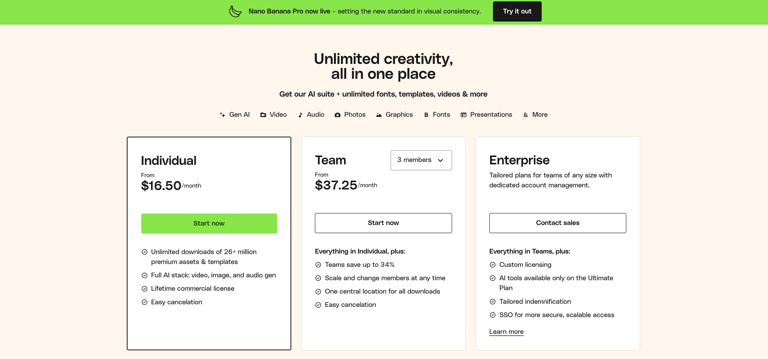
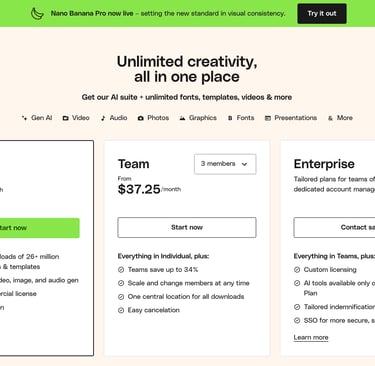
Envato Elements pricing remains one of the most affordable
Monthly Plan
Approx. $16.50–$19 USD per month
Annual Plan
Approx. $11–$13 USD per month (billed yearly)
Think about this:
Buying just one video template elsewhere = $29–$49.
Envato lets you download unlimited items for the same price.
5. How Beginners Can Use Envato Elements to Make Money
This is where the real value begins — and the part most people overlook.
Start Freelancing
Use the templates to deliver:
Logos
Business cards
Brochures
Slideshows
Videos
Social media ads
Platforms: Fiverr, Upwork, Freelancer, Etsy.
Start a YouTube Channel
Use:
Intro templates
Music
Thumbnails
Editing presets
Sell Printable Designs
Use assets to create:
Invitations
Posters
Wall art
Templates
Platforms: Etsy, Shopify, Creative Market.
Create Instagram/FB Reels
Use animated templates and titles to improve growth.
Build Client Websites
Use website themes + UI kits.
Create Ads for Local Businesses
High-quality ads = fast approvals and better conversions.
6. Must-Have Asset Categories for 2025
Here’s what’s trending (and converting) this year:
AI-Enhanced Templates
AI-ready graphics, image prompts, and storyboards.
Gradient & Neon Graphics
Perfect for Gen-Z-focused brands.
Minimalist Logo Packs
Fast delivery, high demand.
3D Vibrant Icons
Modern UI/UX trend.
Smooth Kinetic Typography Videos
Trending for brand reels.
Cinematic LUTs
Perfect for filmmakers & creators.
7. How to Use Envato Elements Step-by-Step (Beginner Tutorial)
1. Go to Envato Elements
2. Search: “Logo Template” (or anything you want)
3. Choose a template
4. Download in your preferred format (PNG, ZIP, Ae, Pr)
5. Open in your editing software
6. Customize text, colors, effects
7. Export
8. Deliver to client or upload to social media
8. Who Envato Elements Is Best For
This tool is ideal for:
• Graphic Designers
• Freelancers
• YouTubers
• Video Editors
• Photographers
• Social Media Managers
• Small Business Owners
• Students
• Bloggers
• Agencies
• New immigrants starting freelance careers in Canada

If you create anything, this toolkit is for you.
9. Pros & Cons of Envato Elements
Pros
• Unlimited downloads
• Affordable
• Massive library
• Easy to use
• Commercial license included
• Time saver
• Great for freelancers
Requires editing software (Photoshop, Premiere, etc.)
Some templates feel similar
No single-purchase option
Cons
10. Final Verdict: Is Envato Elements Worth It in 2025?
Absolutely — especially for creators, new freelancers, and small businesses.
It reduces project time by 70%.
Makes your content look professional instantly.
Costs less than one dinner.
And unlocks millions of high-quality assets.
If you’re building a brand, growing a page, or starting freelance work — Envato Elements is one subscription that actually pays for itself.
Subscribe to our newsletter
Enjoy exclusive special deals available only to our subscribers.